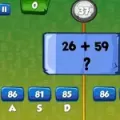
Math Game is an engaging two player browser based mathematics competition. Players test their arithmetic skills across addition, subtraction, multiplication, and division.
About Math Game
General information
- Genre: Educational puzzle and mind game
- Category: Two player educational game
- Tags: Includes tags for educational content, two player mode, and math practice
- Release date: Not verified from available sources
- Latest game update: Not verified from available sources
Game Reviews
| Site | Rating | Vote count |
|---|---|---|
| twoplayergames.org | ★★★★☆ 4.2/5 | 699 |
Review (Steam)
Not verified from available sources
Controls
The first player uses the A, S, and D keys, while the second player uses the J, K, and L keys.
Inspiration
Not verified from available sources
Story
Not verified from available sources
Gameplay
Game loop
Players select a difficulty level and an arithmetic operation category to start a math competition against a friend.
Win, lose and reward rules
Participants must answer math questions quickly across selected operational categories, choosing from three difficulty settings.
Game objects
- Characters: Not verified from available sources
- Enemies: Not verified from available sources
- Items: Not verified from available sources
- Obstacles: Not verified from available sources
- Buildings: Not verified from available sources
- Traps: Not verified from available sources
Visual style
Not verified from available sources
What makes the game appealing
The game helps improve basic arithmetic operations, practical thinking, quick answer skills, and brain capacity while offering an entertaining competitive experience.
Frequently asked questions
What math categories are available in the game?
You can choose from addition, subtraction, multiplication, and division.
Does the game offer different difficulty levels?
Yes, the game features three different difficulty options to choose from.
What are the keyboard controls for both players?
The first player uses the A, S, and D keys, while the second player uses the J, K, and L keys.